A few weeks ago I came across a YouTube video that mentioned CodeRabbit. Since I never heard of it, I wanted to test i first hand to see how it could help me work better and commit better code. So I went to CodeRabbit and gave it a shot. This is my very personal experience based only what I saw and done, and this is a minimal part of what CodeRabbit can do, so take my word with a grain of salt.
Disclaimer: I am NOT associated with CodeRabbit, I do not have an affiliate relationship with them or anything like that.
But first…what the heck is CodeRabbit?
Review Agent or Coding Buddy?
Coding agents like Cursor or Copilot generate whole chunks of new code from prompts. Review agents such as CodeRabbit step in after you write, auditing for errors and improvements with a senior dev’s eye. Basically it polishes what you write/build, which did help to find issues I didn’t know I had and did not catch.
As quick TL;DR: Does it always work? While it caught a 99.9% of code mishaps (thankfully minimal), it did miss two try/exept/finally issues, and missed the wrong indentation in one file. It did happen only a small percentage of the times, and overall I think this product kicks butts.
How do you sign up for CodeRabbit?
That’s quite simple, go on their website, sign up with GitHub, or whatever option works for you, and you are in.

As you can see from the screenshot above, you can choose your subscription and, like I did, you can choose to activate your two weeks Pro Trial. It will link your GitHub account, and you are good to go.
What does CodeRabbit Do?
In a nutshell, it reviews your code for bugs.
While Codex or Claude Code can generate code, give you suggestions or help you debug if you ask them specifically, CodeRabbit is purpose-built for code review as its main function. That means it’s typically integrated directly into your version control system like GitHub, and it automatically runs reviews on pull requests or code changes.
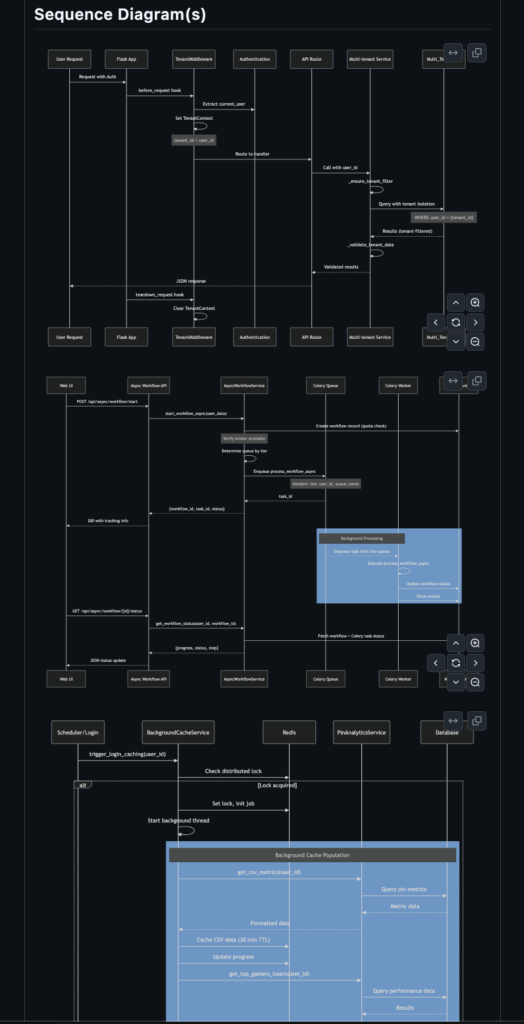
On the example of a pull requests, it also creates a pretty cool Sequence diagram of what’s going on. I had a pretty significant pull request across multiple files in one of my repos, and, alongside a nice summary:
This pull request introduces comprehensive multi-tenant architecture and async workflow infrastructure to the XXXX (sorry it's a private repo...) application. It adds support for credit-based billing, tier-aware task routing via Celery, tenant-isolated database operations, background analytics collection, analysis and content management, and enhanced monitoring across the entire system.
Then it added a comprehensive table with changes to the files grouping them by topic/function as follows:
Documentation & Configuration, Multi-tenant Infrastructure, Application Initialization, Exception Handling, API Routes – Core Workflows, API Routes – Analytics & Monitoring, API Routes – Billing & Admin, API Routes – Debug & Utilities, Celery Configuration & Task Routing, Celery Tasks – Core Workflows, Celery Tasks – Image & Analytics, Celery Tasks – Content & Credit, Analytics Services, Async & Cache Services, Integrations & Utilities, Database & Scheduler, Utilities & Scripts, Summary & Deployment Documentation
Lastly, it created this cool Sequence Diagram, well, three of them, to visualize the flow of code changes across the pull request. Here’s the screenshot:
Ok… I was quite happy with that.
CodeRabbit in VS Code
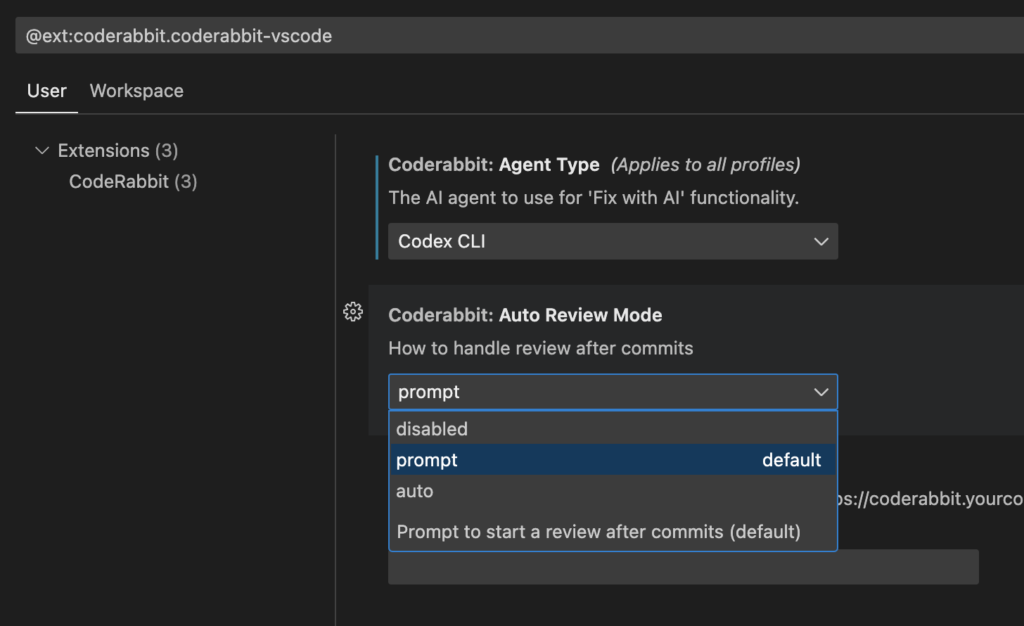
Next up for me was to use CodeRabbit in VS Code. You download the plugin, log in (you’ll be sent to their website) and you are ready to go. Well, almost, you need to go into Setting and choose how you want to use CodeRabbit. Since I use Codex CLI, I picked that as the Agent Type to use when something needs to be fixed. There is also an extensive guide for VS code here: https://docs.coderabbit.ai/guides/use-vscode .
When you edit a file or multiple files and commit them to Git, it automatically asks you what you want to do. If you choose to review them, then you see something like the screenshot below.
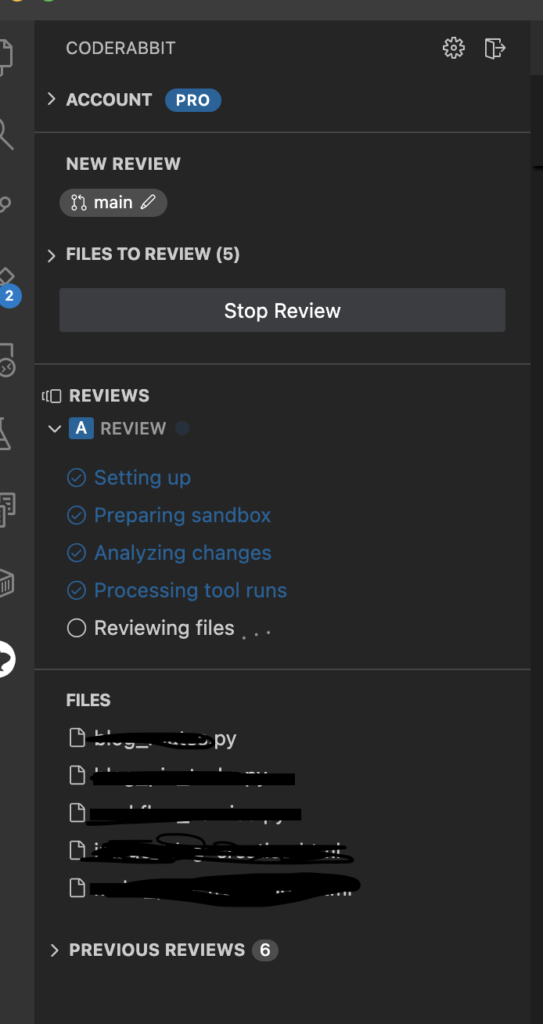
Once CodeRabbit is done with its review, it will tell you either of two things: 1) you are good to go, 2) it found and issue, it will report it with the severity, and send you straight to the block of code that needs to be addressed. In this example I was lucky and there were no edits needed.

However, when issues are found, then you will have to choose how to fix them. CodeRabbit will give you an immediate suggestion and you will see something like this, that happened to me on a later commit:

Then, if you click on the issue, CodeRabbit will send you directly to the line of code with the problem, explain what’s going on and give you suggestions on how to fix it. In my case, it looked like this:
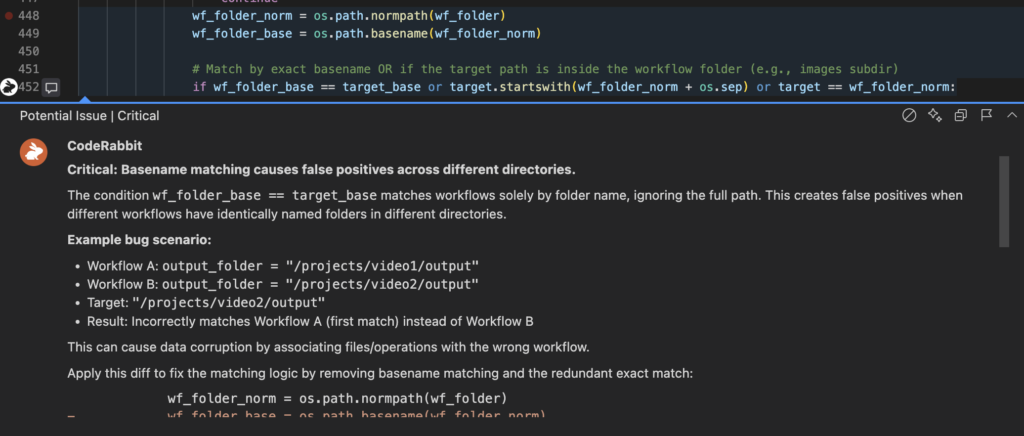
And if you select the two stars on the upper right, it will automatically call your Coding Agent, Codex CLI for me, and explain how to fix it. In my case, it looks like this:
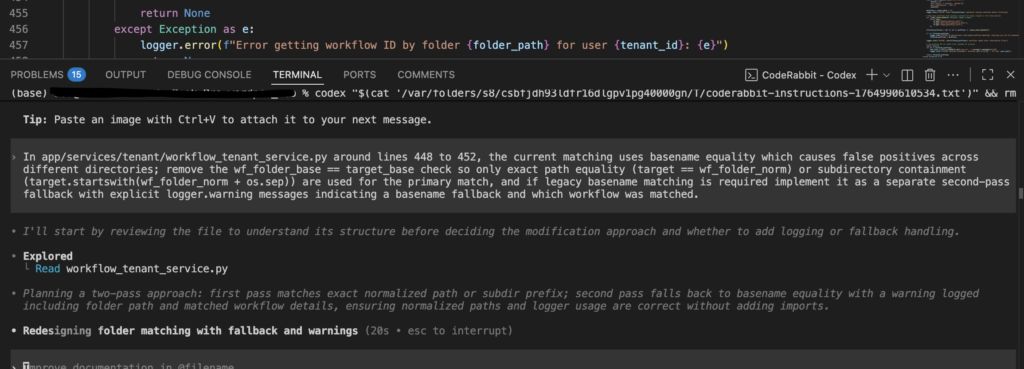
My issue was that a proper path was not passed across workflows and did not allow users to use one of the tools. This found the bug, and fixed it.
It’s a clean, easy to follow suggestion on how to un-bug your code. You also can decide to “Fix with AI”, in this case it will send a prompt to your terminal, call Codex CLI/Claude Code/Gemini CLI with the file name, and the ID of the suggestion it added. Your Coding Agent will then check it, and, if safe and correct, implement the fix.
Overall, what do I think about CodeRabbit?
I’m more of a data analytics guy, and by far, I’m not the best coder, especially when it comes to software development. I have a lot to learn. That is EXACTLY why I liked CodeRabbit. For me, it is a winner.
While I love Codex CLI, this is different. Coding agents are great to draft, write and prep your code, however, CodeRabbit excels in the nitty-gritty painful task or finding half-hidden bugs, telling you where they are, how to fix them and/or it fixes them for you.
How much does CodeRabbit cost?
Depending on how much you code, you can either use it for free or you can spend $24/month. I think I just missed the Black Friday discount, but I do believe it’s worth given the quality work you get.
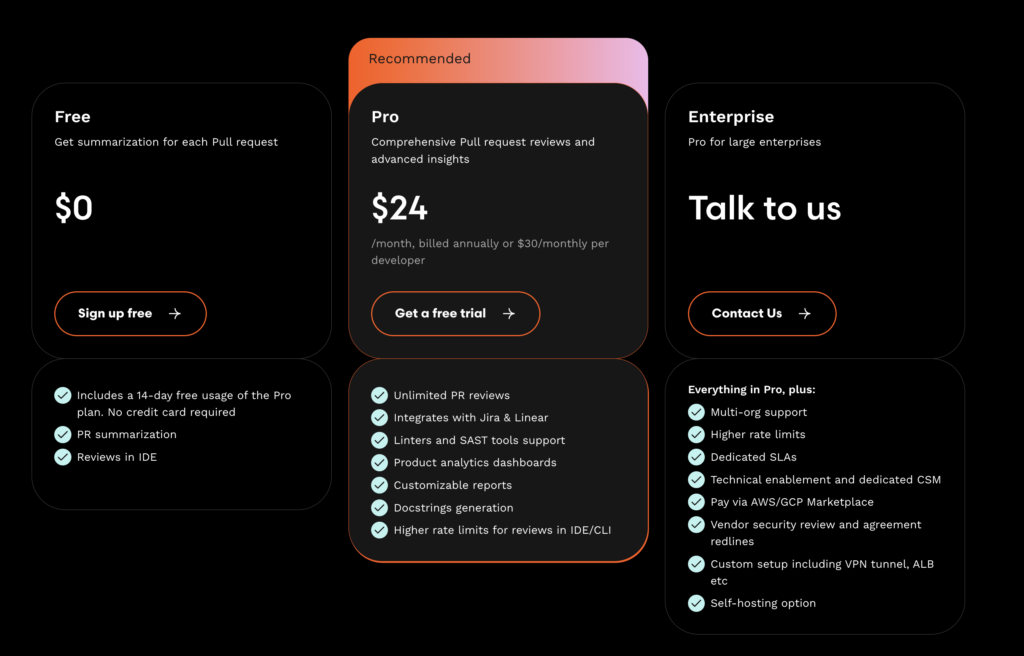
I hope this was useful, what do you think about CodeRabbit? Do you use it? Let me know!
Or read more at letsjustdoai.com